What are routines on Alexa?
 “Alexa, morning playlist”
Here are the 6 Alexa routines you should try:
1. Turn on a playlist
When I listen to music, I generally listen to my favorite playlist of the moment. It’s pretty easy to play a Spotify playlist on Alexa or a Pandora station on Alexa just with an Alexa voice command. But I can never remember the exact playlist name to summon it with Alexa. My solution: I created an Alexa routine that turns on the playlist whenever I say “Alexa, playlist.”
Pro Tip #1: You can easily change the routine to play a different playlist.
Pro Tip #2: If you want to easily summon multiple playlists, create a few routines with different Alexa command triggers. For example, “Alexa, morning playlist,””Alexa, relaxing playlist,””Alexa, energize playlist,” etc.
2. Keep your kids on schedule
Busy household with busy parents trying to keep multiple kids on schedule? Routines are a lifesaver. Use them to remind each of your kids about their various activities — like when to get ready for soccer practice on Sunday mornings or violin lessons on Thursday evenings.
Here’s an example of what Alexa can do via a routine:
- Announce “[your kid’s name], time to get ready for soccer!” across your household’s Echo speakers
- Tell your kid the weather (so he/she is dressed appropriately)
- Play your kid a fun song for some motivation to get ready
- Announce “[your kid’s name], we’re leaving for soccer now!” 5 minutes later
Thinking of getting Alexa speakers for your kids’ rooms? Check out VoiceBrew’s Alexa speaker guide!
3. Wake up and go to sleep better
How do I get Alexa to wake me with music?
Waking up. Awaken as the lights gradually come on and the room warms up, let Alexa brew your morning coffee (all you need is an Alexa smart plug!) and get your weather, news, traffic
Going to sleep. When you’re ready to fall asleep, just say “Alexa, good night” to turn off the lights, play Alexa sleep sounds and set do not disturb.
Pro Tip: Don’t have smart lights yet? Check out VoiceBrew’s guide to Alexa Hue lights to find out how to easily set up smart lights in your home and figure out which type of smart lights are the right ones for you.
4. Automate the things you do when you get home
One of the cooler Alexa features is the ability to trigger a routine based on your location. Here are some things you could automate as part of a location-based routine that kicks off when you get home:
- Turn on the lights
- Set the thermostat to your preferred temperature
- Turn on your favorite music or playlist
- Alexa says “Welcome home!”
- Announce you’re home across your Echo devices (especially handy if you have a home with multiple floors)
5. Make it look like someone’s home even when you’re away
Can Alexa randomly turn on lights?
Create a simple recurring Alexa routine that turns the lights on and off and plays music or news. If you want to be fancy, set up different routines for different days of the week so the routines look less automated to onlookers.
6. Make someone laugh
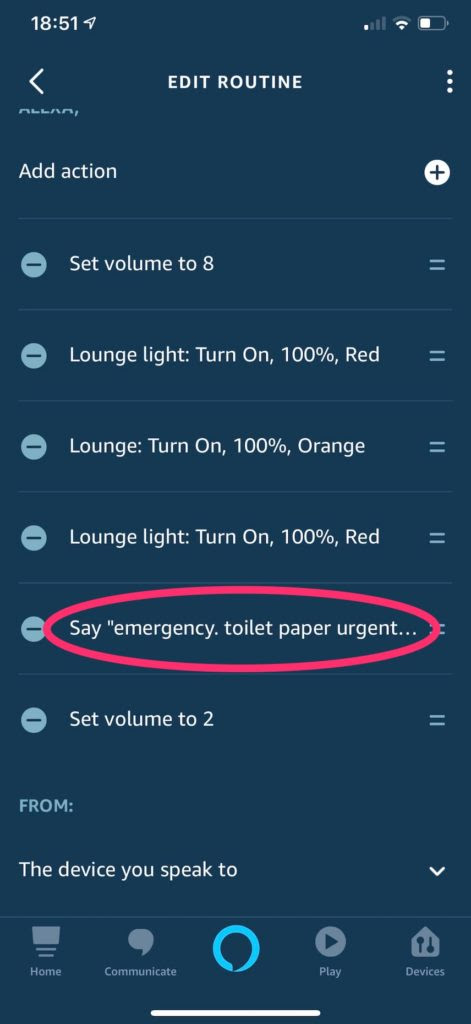
Routines can be funny too! Thank you Reddit user u/pimparoo25 for this hilarious one. We’ve all been there.
How to create an Alexa routine in 90 seconds or less
Just follow these 5 easy steps:
- Open up the Routines tab in the Alexa app
- Tap the + icon in the upper right corner to open up a New Routine tab
- Tap “When this happens” to choose the trigger (time + day, voice command or location)
- Tap “Add action” to set the actions you want to happen in response to the trigger
- Tap “Save” in the upper right corner
For more details (and screenshots to guide you), check out VoiceBrew’s comprehensive Alexa routine guide.