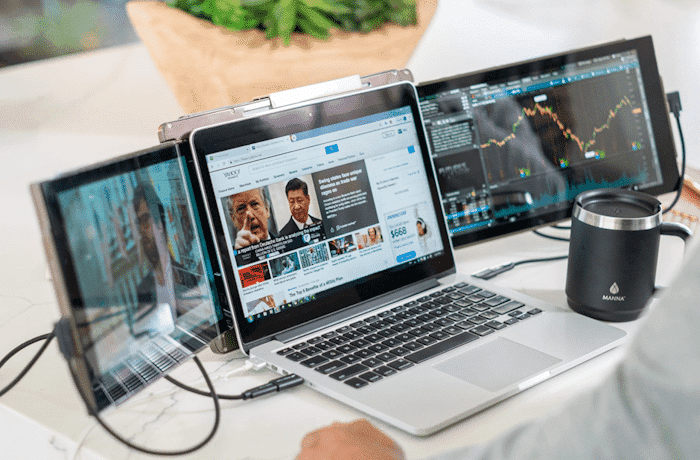
Many people keep juggling between different tasks. A single-screen laptop can not help them. The users feel that the area to manage projects is small. It is because they need to manage multiple tabs, apps, and files open at once. With this kind of cluttered space, your focus can quickly drain. However, with extra screens using a laptop screen extender, you can easily transform your workspace. You can easily create the order and maintain a steady workflow.
Besides, many people don’t learn how to organize their multiple screens to manage their work effortlessly. In this post, you can check that. There is a list of tips that are easy to understand and implement for a well-maintained workspace.
The Reason Why Organization Really Matters
An organized workspace has various benefits. The main reason is that they lead the users to a sharper focus. When the screens become messy with overlapping windows, your brain works harder to keep up. On the other hand, an organized layout frees your mind. A better digital order on your screen helps you to move without constant interruptions. One device that plays a critical role here is the Mobile Pixels Trio laptop screen extender. It offers you the space that you need to divide your workload.

Mobile Pixels Trio Laptop Screen Extender
Some Practical Tips to Stay Organized
With the right approach, the extenders can save you. The following are some significant tips that will help you maintain a better workflow:
1. Set Clear Roles for Each Screen
The first tip that is helpful is to assign each screen a particular role. Without the right structure, multiple screens can create more confusion. So, treat the screens like a well-planned desk for you. For example, use one screen for communication, another for research, and a third for presentations. This way, it becomes easy to shift between the tasks without losing focus.
2. Reduce the Digital Clutter
Another effective tip for screen extender users is to limit the overcrowding of the tabs. It is because it can slow down your work progress. An example to maintain it is like using your left screen to hold any active work tabs. On the other hand, use the right one for reference materials. So, the key here is to limit what stays open on your screen. And, once the task is complete, close its tab. It helps to restore the balance.
3. Keep the Communication Separate
One more tip to make your workflow better is to keep your communication apps on a different screen. Anyone can imagine that constant notifications can disrupt focus. A single glance at the side screen lets you check your messages without breaking the flow. It is the division that will prevent your emails or chats from occupying your primary workspace. So, dedicate one screen to communication.
4. Maintain a Visual Workflow
When you use a laptop screen extender, you can get the chance to design a better digital workflow. It is possible by placing your tasks in a more logical sequence across your screens. And then the work will feel more natural to you. When you set the screens right with the particular tasks, your eyes will follow a path that mirrors the task itself. With this organization, you can easily reduce the confusion and also get better focus.
Finally, Keep it Simple
In the end, you can see that some tips can make your workspace organization game easier. The ones that you notice above can help you create a system that supports focus and reduces clutter. And the digital solution that makes it possible for you, with the right usage, is a laptop screen extender.