Troomi Kids Phone Review: A Smarter First Smartphone for Families
Why the Troomi Kids Phone Exists
Giving a child their first smartphone creates a real tension. You want connection and safety, but you also want to avoid unrestricted internet access. The Troomi kids phone sits directly in that gap, promising a controlled smartphone experience without stripping away useful functionality.
This device positions itself as a middle ground between basic talk-and-text phones and fully open smartphones. It targets families who want flexibility as their child grows. In this review, we break down how the Troomi kids phone actually performs, where it stands out, and where it may not fit every household.

Last update on 2026-09-23 / Affiliate links / Images from Amazon Product Advertising API
Product Overview
The Troomi Phone for Kids and Teens – Galaxy A16 uses a modified Android foundation with a heavily controlled ecosystem. Unlike toy-like kids phones, this is a real smartphone platform with a curated experience.
It competes directly with alternatives like the Gabb Phone 4 and Bark Phone, but takes a more flexible approach. Instead of locking everything down permanently, it allows parents to gradually unlock features over time.
That single design decision shapes everything about the experience.
Design and Build: A Real Phone, Not a Toy
The Troomi kids phone uses a Samsung Galaxy A-series base. That matters because it avoids the biggest issue with many kids devices, which is cheap hardware.
In practice, this feels like a standard mid-range smartphone. The screen size, weight, and build all match what teens expect from a modern device. That reduces friction immediately. Kids do not feel like they are using a restricted or “baby” phone.
This also affects longevity. A device like this can realistically last several years, instead of being replaced as soon as a child outgrows it.
The trade-off is durability. Unlike rugged kids-only devices, this is still a standard smartphone. A case becomes essential.
Controlled OS and Parental Framework
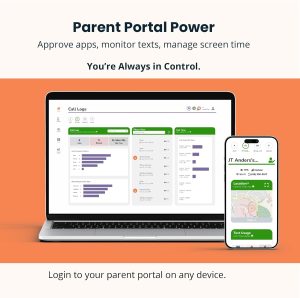
Here is where the Troomi kids phone separates itself.
Instead of relying on third-party parental control apps, it uses a custom operating layer. That system removes access to the open app store and replaces it with a curated environment.
What That Means in Practice
Parents control:
Contacts and communication permissions
App availability
Screen time rules
Content filtering
The key difference lies in progression. You can start with a locked-down experience and gradually introduce apps and features.
That matters because most families do not want a permanent restriction model. They want a phone that evolves with their child’s maturity.
Other systems, like Bark or Gabb, lean more toward fixed environments. For example, some competitors remove internet access entirely or limit apps to a predefined list.
Troomi instead acts more like a staged system.
Monitoring, Transparency, and Safety Tools
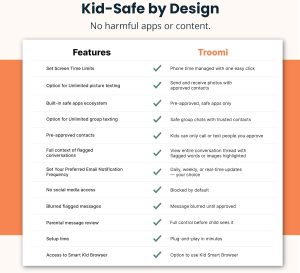
Safety is the core selling point of the Troomi kids phone, and it goes deeper than simple restrictions.
The system includes:
Text monitoring and alerts
Usage insights and communication patterns
GPS location tracking
Content filtering
One standout feature involves behavioral insights. Parents can view trends in messaging activity and contact frequency.
That creates a different kind of oversight. Instead of just blocking content, it gives context.
Why That Matters
In real-world use, problems rarely come from a single message. They come from patterns. Increased communication with unknown contacts or unusual timing can signal issues early.
This approach shifts parental control from reactive to proactive.
Real-World Performance: Daily Use with Kids and Teens
A kids phone only works if the child actually wants to use it. That is where many competitors fail.
The Troomi kids phone performs like a normal Android device in everyday tasks. Messaging feels responsive. Calls remain clear. Navigation works as expected.
For school and after-school activities, GPS tracking adds peace of mind. Parents can check location in real time, which aligns with what most modern safety-focused devices offer.
Everyday Scenarios
A middle school student texting parents after practice
A teen coordinating group projects
A child walking home with location tracking active
In each case, the phone behaves like a normal smartphone, but within defined limits.
That balance is where it succeeds.
App Ecosystem and Flexibility
The app system on the Troomi kids phone sits between two extremes.
On one side, devices like Gabb restrict apps to a small, pre-approved list. On the other, standard smartphones allow everything.
Troomi introduces a curated app library with the option to expand over time.
Key Advantage
Parents can approve access to specific apps instead of unlocking everything at once.
This becomes especially useful for:
Educational tools
Messaging platforms
Navigation apps
Creative tools
As a result, the device can transition from a basic phone into a more capable smartphone.
The trade-off is complexity. More flexibility means more decisions for parents.
Connectivity and Service Model
The Troomi kids phone requires a dedicated service plan and activation. That places it closer to carriers like Bark rather than standalone unlocked devices.
What This Means
Monthly subscription required
Integrated parental dashboard
Centralized control across features
This approach ensures that monitoring and controls remain consistent. It also removes compatibility issues that often come with third-party apps.
However, it does introduce ongoing cost. That becomes an important consideration for long-term use.
Battery Life and Daily Reliability
Battery performance depends on the underlying Galaxy A-series hardware. That typically translates to all-day usage under normal conditions.
For kids, usage patterns differ from adults. Screen time tends to be shorter but more frequent. GPS tracking and background monitoring also add load.
In practice:
Light use easily lasts a full day
Heavy messaging and location tracking may require nightly charging
That aligns with most smartphones in this category.
How It Compares to Gabb and Bark
The Troomi kids phone sits in a very specific position.
Compared to Gabb Phone
Gabb removes internet access entirely
Troomi allows controlled access and expansion
Gabb suits younger children
Troomi suits growing teens
Compared to Bark Phone
Bark focuses heavily on content monitoring across platforms
Troomi emphasizes control and customization
Bark offers deeper monitoring alerts
Troomi offers more flexible app progression
Bottom Line
Choose Gabb for maximum restriction
Choose Bark for advanced monitoring
Choose Troomi for balance and growth
Ideal Use Cases
The Troomi kids phone works best in households that want flexibility.
It fits:
Parents introducing a first smartphone gradually
Families with pre-teens transitioning into teen years
Users who want monitoring without full lock-down
It also works well for students who need some apps for school but should not have unrestricted access.
Things to Consider
The Troomi kids phone does not aim to be the simplest option.
The subscription model adds ongoing cost. Over time, this can exceed the price of the device itself.
The flexibility also requires involvement. Parents need to actively manage settings, approvals, and monitoring.
For families who prefer a “set it and forget it” solution, a more locked-down device may feel easier.
At the same time, this flexibility becomes a strength for long-term use.
Final Verdict: Who Should Buy the Troomi Kids Phone
The Troomi kids phone delivers something most competitors do not. It provides a controlled smartphone experience that evolves with the user.
It avoids the two extremes of total restriction and total freedom. Instead, it creates a guided path.
For parents who want long-term value and gradual independence, it stands out as one of the most practical choices available.
For those who want strict limitations with minimal oversight, alternatives like Gabb or Bark may feel more straightforward.
In the end, the Troomi kids phone succeeds because it treats digital access as a process, not a switch.
Affiliate Disclosure
GadgetGram may earn a small commission if you purchase through links on this page. This helps support our independent testing and editorial work. We only recommend products we’ve researched or tested ourselves, and our opinions remain unbiased regardless of affiliate relationships.