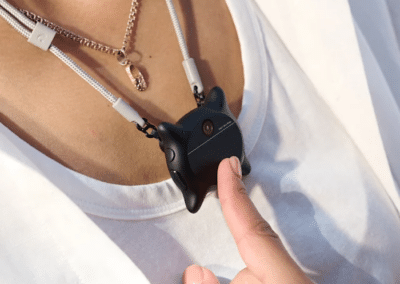
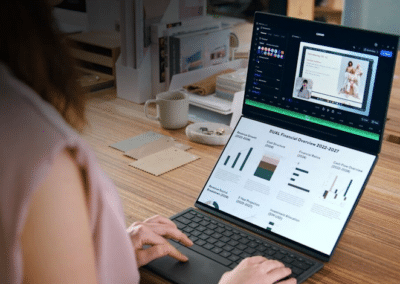
Keeping your files accessible wherever you go has become more important than ever, especially since we rely on multiple devices throughout the day. A portable NAS device gives you your own private cloud, letting you store, access, and share files securely without depending on third-party services. These compact systems are perfect for backing up photos, videos, and important documents while traveling or working remotely, all while maintaining fast transfer speeds and reliable performance. For a portable NAS that offers you on-the-go storage with greater control over your data, check out the StationPC PocketCloud.
The StationPC PocketCloud is a portable NAS device that enables users to store, access and share files securely without relying on third-party cloud services. It supports high-speed M.2 NVMe SSDs with up to 8TB capacity (expandable to 16TB with its dock) and also integrates a SD card slot. The device features three-layer backup protection, including direct save to the NAS, sync to the Dock, and cloud upload via the app. It supports five backup methods, including USB-A, AP mode (built-in hotspot), SD card, Wi-Fi mode, and Ethernet transfer (dock required).
The device integrates built-in a smart control knob and a 0.96″ LCD for real-time NAS monitoring. It boasts Bluetooth 5.3 and Wi-Fi 6 connectivity, and offers up to 6 hours battery and 20 days of standby. Via the StationCloud app, users can access stored files remotely, manage data transfers and create backups.
Designed as a simple, physical alternative to traditional cloud storage, this portable NAS lets users expand storage, automatically back up content, and transfer data freely without monthly fees or requiring internet access.
Here’s our comprehensive review of the StationPC PocketCloud, where we explain how this portable NAS works and discuss its standout features.
DESIGN: Built with Portability & On-The-Go Use in Mind
Starting with the device’s size, this SSD has a compact form factor, measuring just 6.02 inches long by 3.66 inches wide by 1.06 inches thick (153 x 93 x 27 mm). The device is also rather lightweight, weighing just 12.82 oz. (363.5 g). Its sleek dimensions make it easy to fit inside your pocket, bag, or backpack.
The StationPC PocketCloud also features a minimalist design, which gives it a discreet, yet professional appearance. It comes in a Silver color tone with a smooth finish.
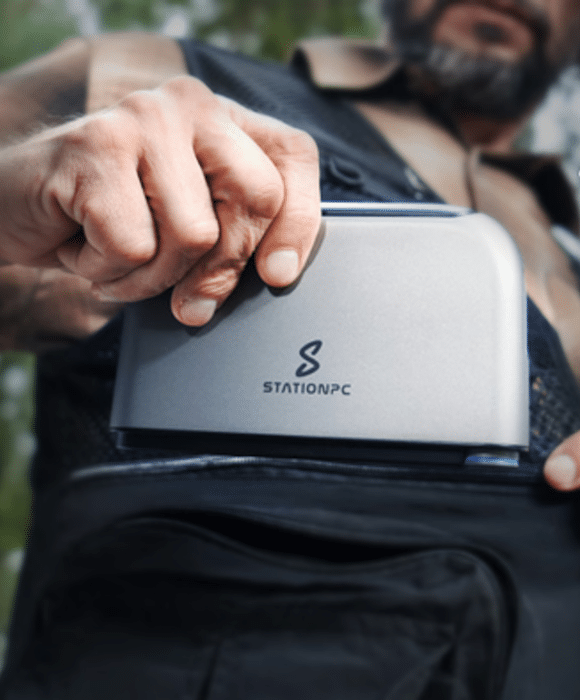
StationPC PocketCloud – Portable and lightweight
Moreover, the device also packs a high-quality construction, because unlike bulky, stationary NAS systems, the PocketCloud is built to move. It features a sturdy aluminum alloy housing plus an intelligent turbo cooling fan, which ensures efficient heat dissipation, long-term durability, and reliable performance even in demanding environments. Its base is crafted from ABS plastic and PC plastic.
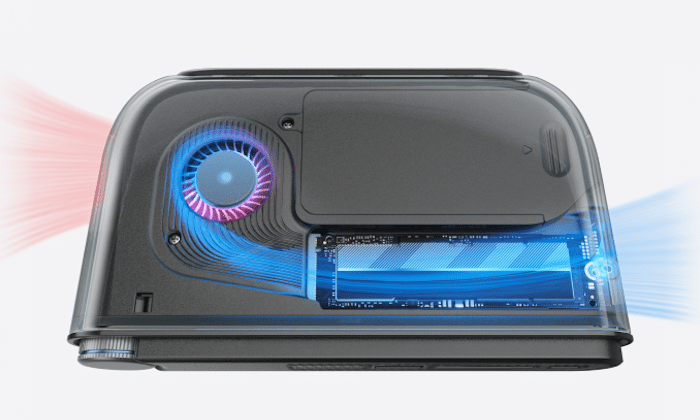
Features an advanced cooling system
HARDWARE SPECS: Engineered for Fast, Powerful Performance
Moving on to the device’s hardware specifications. When it comes to its storage capacity, the StationPC PocketCloud supports a single high-speed M.2 NVMe 2280 SSD with a capacity of up to 8TB. Note the device doesn’t come with a pre-installed SSD card, meaning you can choose the capacity and brand that best fits your needs. Thanks to that, you’re able to store countless photos, 4K videos and files. Its M.2 slot is also compatible with exFAT file system.
Furthermore, the device also integrates an SD card slot, which provides further storage space. This makes it a powerful all-in-one data management solution for photographers, filmmakers, digital nomads, and professionals.
Nevertheless, the device’s storage capacity can ultimately be expanded to 16TB by installing an additional SSD in the PocketCloud’s optional dock (sold separately).
Its dock features a revolutionary modular design, which enables users to mix storage capacities with no RAID limits. As such, you can create the storage setup that fits your workflow. When magnetically connected to the Dock, the PocketCloud automatically backs up your data and charges, supporting seamless multi-device management.
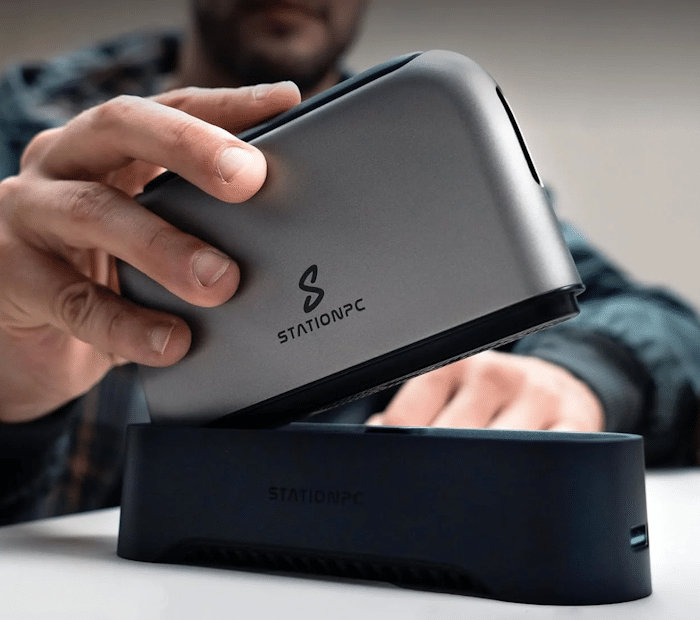
Features a proprietary dock with a modular design (for expanding its storage)
At its core, the PocketCloud leverages a RK3568B2 Quad-core Cortex-A55 processor that delivers powerful performance, ensuring stable, high-speed transfers. The device boasts 4GB of LPDDR4 RAM, which ensures smooth operation when multiple devices connect at once. For a NAS appliance, this is more important than raw CPU speed.
Its processor also integrates an onboard NPU that provides up to 1 TOPS (Tera Operations Per Second) of AI acceleration. Its NPU enables features like photo organization with face and scene recognition. That matters because file management becomes faster as your library grows.
In addition, it also comes equipped with an ARM Mali-G52-2EE GPU supporting OpenGL ES 1.1/2.0/3.2, OpenCL 2.0, and Vulkan 1.1. However, this NAS has no HDMI port, so its GPU ends up going unused.
As for its operating system, the device runs on StationOS, an intuitive operating system that enables for seamless data management, allowing you to back up, sync, and access files across devices anytime. The device’s StationOs can interface with all major platforms, including Windows, macOS, Android, and iOS.
INTERFACE & PORTS: Designed for Modern Workflows
For controlling its operation, the PocketCloud features a simple, user-friendly interface that makes it easy and intuitive to use.
The device integrates a built-in a smart control knob and a 0.96″ LCD that provide real-time feedback on memory usage and progress. This ensures users can monitor file backups in real-time, even in low-light conditions or outdoors.
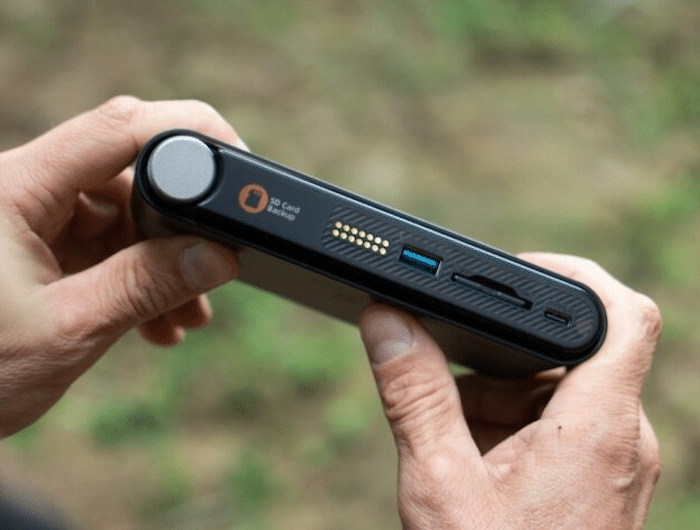
Pressing its control knob for 3 seconds powers on the device, while turning it lets you select between backup modes.
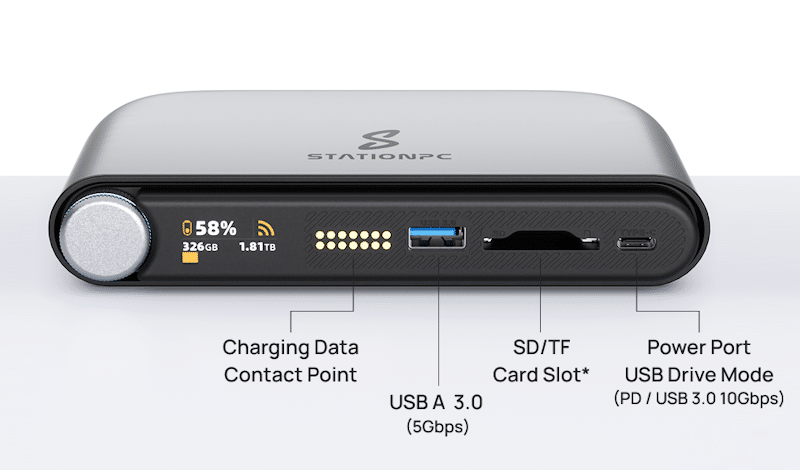
In regards to its connection ports, the PocketCloud features a USB-A 3.0 port, an SD card slot, and a USB-C port for charging it. Its SD card slot also supports TF cards, but a TF card adapter is required.
On the left of its I/O ports, there’s also the contact points for connection the device to its proprietary dock.
The dock also adds a 2.5 Gbps Ethernet slot, a USB-A port, and a USB 3.0 port. The 2.5GbE port on the dock is a major upgrade for desk setups. It enables significantly faster transfers when working from home or a studio environment.
NOTABLE FEATURES: Data Protection, Security, Backup Methods & Smart Functions
Triple Backup Assurance
The device features three-layer backup protection, letting you save data directly to the NAS while traveling, sync to the Dock anywhere, and upload to the cloud via the app for additional security. This combination of backup protection methods helps ensure enhanced security, protecting photos, videos, and files to minimize data loss.
Bank-Level Data Privacy & Security
With PocketCloud, your login data is securely stored directly on your device, ensuring complete privacy. More specifically, the device utilizes bank-grade data privacy, including SSL and asymmetric encryption. Therefore, your sensitive information is fully protected in an encrypted space.
Versatile Backup Modes and Transfer Speeds
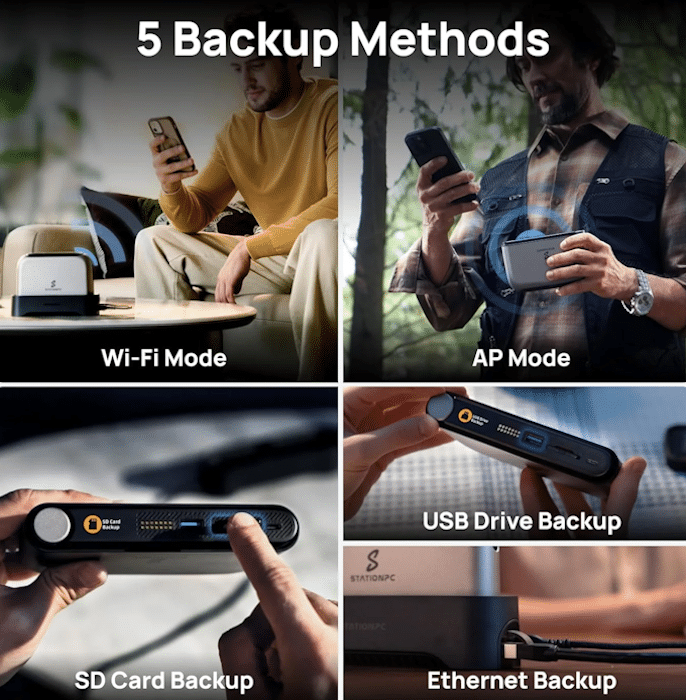
The device supports five backup methods boasting different read/write speeds, which include:
- USB-A—Delivers up to 220MB/s read and 208MB/s write
- AP Mode (built-in hotspot)—Delivers up to 65MB/s upload and 68MB/s download
- SD Card Backup—Delivers up to 58MB/s read and 59MB/s write
- Wi-Fi mode—Delivers up to 45MB/s upload and 50MB/s download
- Ethernet Transfer (dock required)—Delivers up to 110MB/s upload and 115MB/s download
AI ALBUM
The StationPC PocketCloud also features an AI album powered by its NPU that automatically organizes photos by face, scene, or event. This smart functionality essentially mirrors the convenience of major cloud galleries, minus the data mining, allowing for easy viewing, sorting and sharing.
CONNECTIVITY METHODS: Supports Wired & Wireless Connections
For its main connection method, the device features USB-A connectivity, letting you connect it directly to a desktop or laptop.
Alternatively, for wireless connectivity, the device features both Bluetooth 5.3 connectivity and Wi-Fi 6 (802.11 ax) connectivity.
BATTERY & BATTERY LIFE: Built for Real-World Use
For its power, the device uses dual 3200mAh (23.04Wh) Lithium-Ion batteries, which offer up to 6 hours of battery life and 20 days of standby. Its batteries are also replaceable, meaning users can carry spares to stay powered during long photo-shoots or remote work sessions.
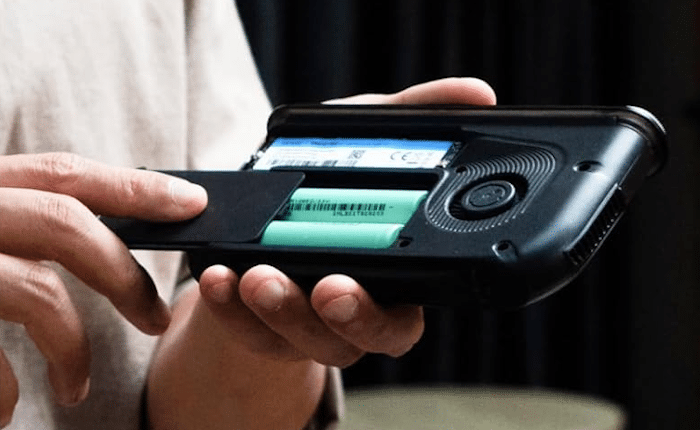
Additionally, the device’s USB-C port also supports PD fast charging, which together with its 30W charger ensure minimal downtime.
THE DESKTOP / SMARTPHONE APP – The StationCloud App
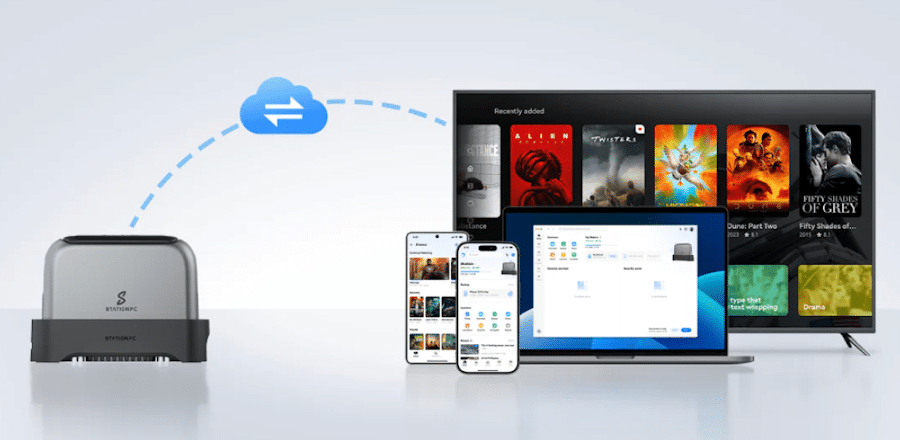
Users are required to install the StationCloud app on their PC, smartphone, or smart TV to be able to use all of the device’s backup methods.
The app is available for Windows, macOS, Android and iOS phones, as well as for Android TV.
StationCloud app
Via the StationCloud app, you can easily upload photos, videos, and files to your hard drive cloud for secure backup and convenient sharing. Through the app, these files can also be accessed and managed at any time
The app also allows users to automate transfers between storage locations, which provides a balance between home and business functionality, with a possible lean towards the home user.
How It Compares to Alternatives
The StationPC PocketCloud competes with several categories.
External SSDs
External drives offer speed and simplicity. They lack wireless access, automation, and remote functionality.
The StationPC PocketCloud adds intelligence to storage.
Traditional NAS Systems
Desktop NAS units offer higher capacity and RAID setups. They lack portability.
The StationPC PocketCloud trades scale for mobility.
Cloud Storage Services
Cloud platforms offer convenience but require subscriptions and trust in third-party systems.
The StationPC PocketCloud gives you ownership while maintaining access flexibility.
Each alternative solves part of the problem. The StationPC PocketCloud brings those pieces together.
Things to Consider Before Purchasing
The StationPC PocketCloud is not for everyone.
Firstly, you need to purchase an SSD separately, which increases its total cost.
The device supports only one internal drive in the main unit; not to mention that full functionality requires the dock.
The processor limits advanced computing tasks and its performance ultimately depends on your choice of workflow.
Finally, its wireless speeds are practical but not high-end.
All in all, this is a storage device, not a fully-fledged workstation. These key points aren’t necessarily flaws. Instead, they define the product’s focus.
Final Decision: Who Should Buy the StationPC PocketCloud
The StationPC PocketCloud works best for users who need structured, mobile storage workflows.
In short, it makes sense for:
- photographers and videographers
- content creators managing large files
- professionals working across devices
- users building a private cloud system
It may not suit users who only need simple storage or maximum performance.
In practice, the StationPC PocketCloud succeeds because it focuses on real workflows. It combines portability, flexibility, and control into a single system.
That makes it less of a gadget and more of a tool you build your workflow around.
PRICING & AVAILABILITY
If you’re interested in purchasing the StationPC PocketCloud, know the base unit goes for $299.99.
The Dock is sold separately for $129.99 ($119 on StationPC’s website).
You can buy it on Amazon via this link.


Last update on 2026-10-14 / Affiliate links / Images from Amazon Product Advertising API
Affiliate Disclosure
GadgetGram may earn a small commission if you purchase through links on this page. This helps support our independent testing and editorial work. We only recommend products we’ve researched or tested ourselves, and our opinions remain unbiased regardless of affiliate relationships.