The Changing Role of Artificial Intelligence in Visual Content
AI has turned into a pretty big part of digital content creation. Bigger than most people expected, really. Think about what visuals used to take. Specialized software, some technical know-how, and a lot of time. Now a lot of that happens through simple natural-language instructions. Automated image generation handles much of the rest. And it’s changing how people go about visual projects. Individuals, designers, marketers, educators, content creators. Pretty much everyone who makes visuals is feeling it.
What makes these image systems so interesting? Users just describe an idea. They don’t have to build every piece by hand. There’s no staring at a blank canvas either. A text prompt does the job instead. It might describe a subject, or a setting. Maybe a style, a composition, a certain mood. The system reads all that and works out what’s meant. Then it puts together a visual result. Everything comes from its underlying models.
How Modern Image Generation Works
So, what’s going on behind the scenes? At a basic level, it’s machine-learning models. They’re trained on massive collections of information. Some of it’s visual, some of it’s text. While training, these systems pick up connections. How words link to concepts. How objects, styles, and visual traits relate. That’s what everything else sits on.
Once a user sends in a prompt, the model gets to work. It processes the language first. Then it tries to turn that into an image that makes sense. The more advanced systems can juggle several things at once. Say a prompt describes one particular object. Where it sits in a room. What the lighting’s like. And which artistic style to use. A good model handles all of it together.
How good the result turns out depends on a few things. What the model’s actually capable of. How clear the instructions are. How complicated the requested composition gets. And the uses? There are quite a few, honestly. Brainstorming, concept development, illustrations. Social media content and presentations. Plenty of other visual work too.
Understanding New AI Image Tools
Generative AI has grown fast. Really fast. So now there’s a whole bunch of image tools out there. They don’t all do the same things, though. Some mostly stick to turning text into images. Others go further and mix in extra stuff. Editing, enhancement, transformation. Other creative functions as well.
Tools built on newer image-generation tech might offer handy features. Mostly ones that make experimenting with visuals easier. Anyone curious about where this is going can check out the Nano Banana 2.5 GemPix tool. It’s one example of a wider shift. AI-based creative tech is finding its way into everyday digital workflows.
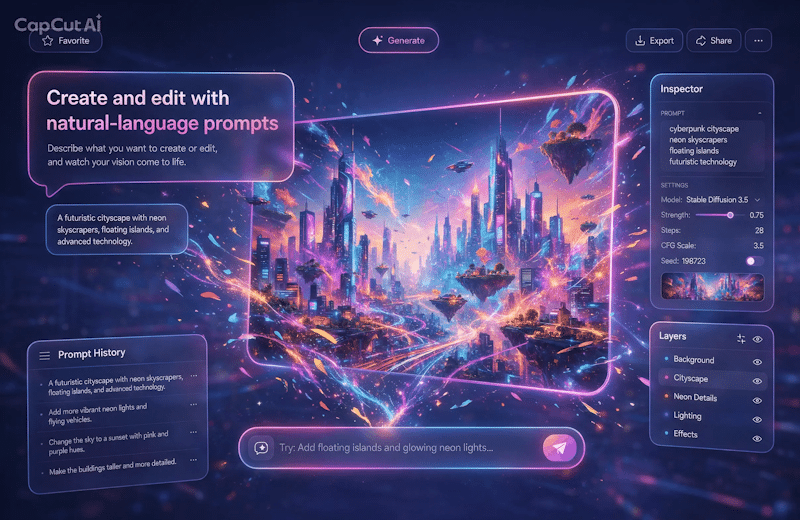
The finished image isn’t necessarily the whole story, though. These tools help earlier in the process too. Right at the start of creative work. People can see their concepts before committing real time. Before any of the slow manual production begins. That alone saves a lot of effort.
Why Prompt Quality Matters
Yes, modern AI can understand natural language. Still, what the user writes shapes what comes out. A vague prompt usually gets a pretty general result. A more detailed one gives the system extra guidance. It gets a better sense of the intended composition.
So, what makes a prompt useful? Naming the main subject helps. So does the environment, the perspective, the lighting. Color characteristics, the artistic approach, other relevant details. But there’s a catch. Stuffing in too many instructions won’t guarantee better results. Not automatically, anyway. Good prompting is mostly about balance. Enough detail, but with clear priorities.
Users might also have to play around a bit. Try different descriptions and see. Even small wording changes can shift results noticeably. Sometimes more than expected. That’s why iteration matters so much in the creative process.
AI Image Generation and Traditional Design
Is AI imagery going to replace traditional design? Not necessarily. The two actually fit together pretty well. They fill in each other’s gaps. A designer might use AI to get initial concepts going. Or to try out alternative compositions. Or just to generate some visual references. Then they refine the idea they picked by hand.
Traditional editing still has its place. Especially when precise control really matters. Once an AI image exists, there’s often more to do. Designers might tweak the typography, or the proportions. Fix branding elements, layouts, colors. Sometimes even individual objects in the image.
What comes out of this is a mixed workflow. AI takes care of some of the exploring. Human creators stay in charge of the real decisions. Purpose, context, accuracy, visual communication. Those still belong to people.
Practical Applications of AI Visual Tools
AI image tech is showing up in a lot of industries. In education, it helps illustrate abstract concepts. Or it creates visuals for presentations. Publishing uses it for preliminary artwork and concept development. Content creators lean on generated images for inspiration. For their videos, their articles, their digital campaigns.
Small businesses find it useful too. So do independent creators. When they’re brainstorming, they can picture an idea quickly. No need to commission custom artwork that early on. Professional designers take it further, of course. They work generated concepts into bigger production pipelines.
What counts as the right use? That depends on the project. And on how much control it needs. For experimentation, AI content can work just fine. Projects with strict visual standards are different, though. They usually need extra human review. Some editing, too.
Limitations and Responsible Use
Things are improving quickly, sure. But AI image generation still has its limits. Generated images can get details wrong. Objects might relate to each other in strange ways. Text can come out distorted. Other visual inconsistencies show up too. So outputs need a careful look. Nobody should assume every result is accurate.
Copyright and licensing are important here as well. The rules for AI-generated material aren’t the same everywhere. They can depend on jurisdiction and platform terms. On the training data. On how the image ends up being used. Anyone making commercial or public-facing content should do some homework. Know the rights and restrictions that apply. And know them before publishing, not after.
Privacy matters too. It’s easy to overlook. People shouldn’t upload confidential or sensitive material to online AI services. Not unless they understand how that information gets handled.
The Future of AI-Assisted Creativity
So where’s all this going? It’ll most likely keep evolving. Models are getting better at understanding instructions. Better at keeping visuals consistent. Better at handling more complex editing workflows. Future systems might bring even more together. Image creation alongside video and audio. Animation and interactive content as well.
The biggest change, though, might be quieter. AI is slipping into ordinary creative software. It’s becoming less of a separate technology. Generative features are turning into part of wider workflows. Just another piece of content production.
At the end of the day, AI image tools are creative technologies. They’re not automatic replacements for human judgment. How useful they are really comes down to people. How thoughtfully they’re applied. How carefully the results get checked. And how well automated generation blends with human creativity and oversight. That’s what makes the difference.